
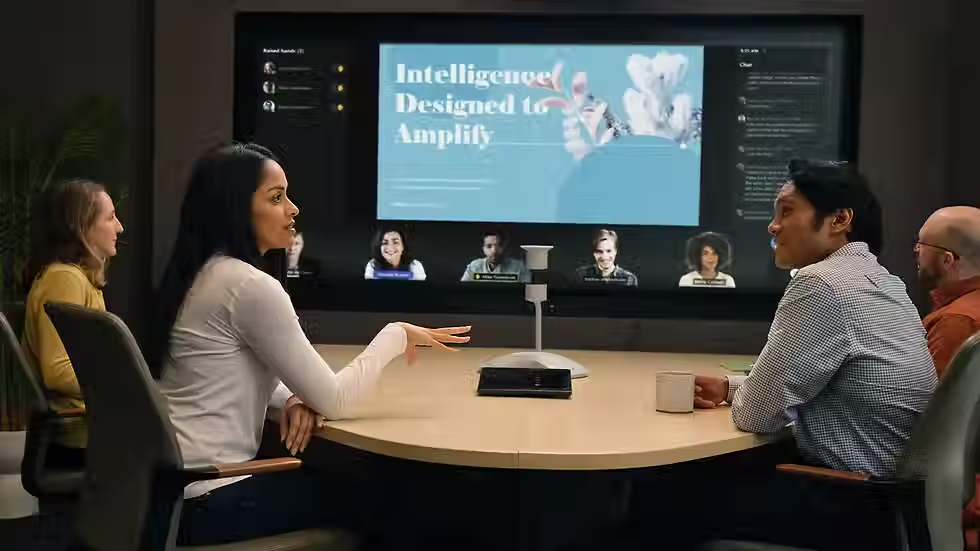
Microsoft Teams Rooms
Intelligent meeting spaces designed for seamless hybrid collaboration
Today's workplace demands more than video conferencing. Teams need meeting spaces that are simple to use, inclusive for remote participants and equipped with the latest intelligent technologies that help people collaborate more effectively.
At Collab AV, we design, install and support Microsoft Teams Rooms that deliver a consistent meeting experience across every workspace. Whether you're upgrading a single boardroom or standardising meeting spaces across multiple locations, we create solutions that combine exceptional audio, crystal-clear video and intuitive room control with the latest AI-powered collaboration features.
As a specialist AV integrator, we work with leading Microsoft Teams-certified hardware manufacturers to deliver meeting rooms that are reliable, easy to manage and ready for the future of hybrid work.
👉Talk to us about creating Microsoft Teams Rooms that people actually enjoy using.

What is a Microsoft Teams Room?
A Microsoft Teams Room is a dedicated meeting room system designed specifically for Microsoft Teams. Unlike relying on laptops and cables, Teams Rooms provide a consistent, one-touch meeting experience using professionally integrated cameras, microphones, speakers, touch controllers and displays.
With meetings launched directly from the room console, users can join scheduled meetings instantly, share content wirelessly and collaborate naturally with colleagues, wherever they're working.
Microsoft Teams Rooms also integrate seamlessly with Microsoft 365, enabling users to schedule meetings through Outlook, access room calendars and benefit from intelligent collaboration features that enhance every meeting.

Designed for today's hybrid workplace
Successful hybrid meetings depend on more than technology—they depend on creating an experience where everyone feels equally included.
Modern Microsoft Teams Rooms use AI-powered features to ensure remote participants can clearly see, hear and engage with everyone in the room. Intelligent cameras automatically frame speakers, advanced audio processing removes background noise, and Microsoft Teams enhances conversations with features such as live captions, meeting transcripts and intelligent meeting recaps.
The result is a more natural meeting experience, regardless of where participants are located.

AI-powered collaboration
Microsoft continues to evolve Teams Rooms with intelligent capabilities that help organisations get more value from every meeting.
Features include:
-
Intelligent camera framing that automatically focuses on participants
-
Cloud IntelliFrame for improved visibility of people in the room
-
Speaker recognition and voice attribution
-
Advanced noise suppression
-
Live captions and transcription
-
Intelligent meeting recap
-
Microsoft 365 Copilot integration for meeting summaries and follow-up actions
-
Front Row layouts designed to improve engagement between remote and in-room attendees
By combining these capabilities with professionally designed AV systems, organisations can improve meeting productivity whilst reducing common frustrations associated with hybrid working.

Why choose a dedicated Microsoft Teams Room?
Many organisations still rely on employees connecting laptops to meeting room displays. While this approach may seem cost-effective, it often leads to delayed meeting starts, inconsistent user experiences and unreliable audio and video quality.
A professionally designed Teams Room offers significant advantages:
-
One-touch meeting join
-
Consistent experience in every meeting room
-
Superior audio and video performance
-
Simple wireless content sharing
-
Integrated room scheduling
-
Secure Microsoft-certified hardware
-
Centralised device management
-
Support for Teams, Zoom and other supported meeting platforms
The result is meetings that start on time, run smoothly and allow participants to focus on collaboration rather than technology.

Microsoft Teams Rooms for every workspace
No two meeting spaces are the same. We design Microsoft Teams Rooms to suit the way your organisation works.
Whether you're creating:
-
Focus rooms
-
Huddle spaces
-
Small meeting rooms
-
Medium collaboration rooms
-
Executive boardrooms
-
Training rooms
-
Multi-purpose presentation spaces
-
Large divisible conference rooms
We specify the right combination of displays, cameras, microphones and room control systems to deliver the best possible experience.
Every design considers room acoustics, sightlines, display positioning, camera coverage and ease of use.

Microsoft Teams-certified hardware
Collab AV works with leading Microsoft Teams-certified manufacturers to ensure every solution delivers exceptional reliability and performance.
We design systems using professional hardware from trusted partners including:
-
Yealink
-
Logitech
-
Jabra
-
Poly
-
Neat
-
Lenovo
-
Shure
-
Biamp
-
Bose Professional
-
Crestron
By selecting the right technology for each environment, we create meeting rooms that are simple to operate whilst providing outstanding audio and video quality
Considering a new Team Room? See how it works in your own space before you decide with out Try before you Buy program

Expert design, installation and support
Delivering a successful Microsoft Teams Room involves far more than installing equipment.
Our experienced consultants work with you from initial discovery through to ongoing support, ensuring every meeting space meets both technical and business requirements.
Our service includes:
-
Workplace consultation
-
Room surveys
-
AV system design
-
Equipment specification
-
Installation and commissioning
-
User training
-
Ongoing support and maintenance
-
Managed services for Teams Rooms
Whether you're fitting out a new office or upgrading existing meeting rooms, we ensure your investment delivers long-term value.

Centralised management with Microsoft Teams Rooms Pro
For organisations managing multiple meeting spaces, Microsoft Teams Rooms Pro provides enhanced device management, monitoring and analytics.
IT teams can remotely monitor room health, deploy updates, receive alerts and maintain consistent performance across every meeting space from a single management platform.
Combined with Collab AV's support services, this helps reduce downtime whilst keeping meeting rooms operating at their best.
Frequently Asked Questions
What is the difference between Microsoft Teams and Microsoft Teams Rooms?
Microsoft Teams is the collaboration platform used on individual devices, whilst Microsoft Teams Rooms are dedicated meeting room systems designed specifically for shared spaces.
Can Microsoft Teams Rooms join Zoom meetings?
Yes. Microsoft Teams Rooms support interoperability with several third-party meeting platforms, allowing organisations to collaborate more easily with customers and partners.
Can existing meeting rooms be upgraded?
In many cases, yes. Existing displays, audio equipment and infrastructure can often be incorporated into a modern Microsoft Teams Room solution, reducing costs whilst improving functionality.
How much does a Microsoft Teams Room cost?
Costs vary depending on room size, technology requirements and the level of integration. We can design solutions ranging from simple huddle rooms through to complex boardrooms and training facilities.
Why Choose Collab AV?
✔ Independent, UK-based experts in workplace technology
✔ Experience with large, multi-site deployments
✔ Person-first approach that prioritises usability
✔ Scalable, secure and fully supported solutions
✔ Proven results across industries including corporate, education and public sector
Ready to transform the way your people communicate?
Let Collab AV deliver the right communication tools to power your workplace of the future.
Making life easier through smarter, simpler tech
Let’s explore your ambitions—together we can create a workplace where collaboration thrives, people stay engaged, and productivity flourishes