
Microsoft Teams Rooms Explained — Setup, Equipment, Best Practice and the Role of AI
- marktildesley
- May 6
- 7 min read
Hybrid working is no longer an experiment—it is the operating model for modern organisations. Yet many businesses still find that their meeting spaces lag behind this reality. Calls start late, remote participants feel disconnected, and valuable time is lost to technical friction.
Microsoft Teams Rooms (MTR) address this challenge by transforming meeting spaces into intelligent, connected environments. When combined with the latest advances in AI, they don’t just improve meetings—they fundamentally reshape how people collaborate.
At Collab AV, we believe the future of workplace collaboration lies at the intersection of robust AV design and intelligent automation—where technology actively enhances human interaction rather than getting in the way.

What Is a Microsoft Teams Room?
A Microsoft Teams Room is a purpose-built meeting room solution that delivers a native Microsoft Teams experience through dedicated, in-room hardware.
It removes reliance on personal devices and inconsistent setups, replacing them with a unified system that integrates seamlessly with Microsoft 365. Meetings start with a single touch, calendars are synchronised, and the room itself becomes a reliable, intuitive collaboration tool.
But the real value lies beneath the surface. A well-designed Teams Room is not just functional—it is predictable, scalable, and frictionless.
This is exactly where Collab AV adds value: designing environments where simplicity for the user is underpinned by sophisticated, well-engineered systems.

How a Teams Room Works
A Microsoft Teams Room is not a single device, but a coordinated system of technologies that have been purpose-built to operate as one cohesive environment.
At the centre of the experience is the touch control panel. This is the primary interface that users interact with, typically positioned on the meeting room table. It provides a clean, familiar layout showing scheduled meetings pulled directly from Outlook, allowing users to join a call instantly without navigating complex menus. This simplicity is critical—it removes hesitation and reduces the cognitive load often associated with starting meetings.
Behind that interface sits the room compute appliance, a dedicated unit running the Microsoft Teams Rooms application. Unlike a personal laptop, this device is always on, always connected, and centrally managed. It ensures consistent performance, applies updates automatically, and integrates securely with the organisation’s wider IT infrastructure.
Visual collaboration is delivered through intelligent camera systems positioned at the front of the room. These cameras are designed not just to capture the space, but to interpret it—detecting where people are seated, identifying active speakers, and adjusting framing dynamically. This creates a more natural experience for remote participants, who can follow the flow of conversation without distraction.
Audio is handled by professional-grade microphones and speakers, carefully selected and positioned based on the room’s size and acoustic properties. Rather than relying on a single pickup point, modern systems use distributed or beamforming technology to capture voices evenly across the space. This ensures that whether someone is seated at the head of the table or the far end, they are heard with equal clarity.
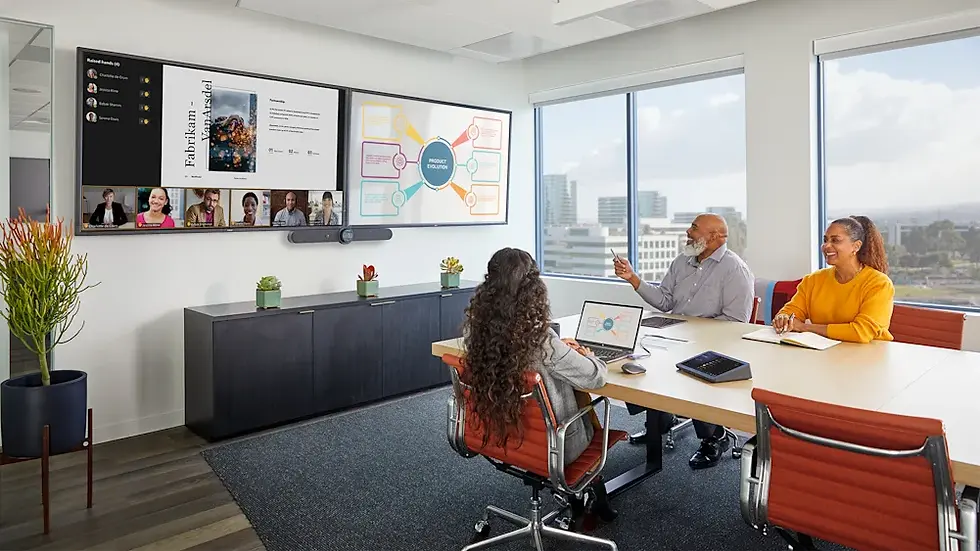
Finally, front-of-room displays bring everything together. These screens present both meeting participants and shared content in a way that supports natural interaction. In more advanced configurations, dual displays allow for separation of video and content, reducing visual clutter and helping participants stay engaged.
Collab AV’s expertise lies in ensuring that all of these components are not only present, but optimally configured to work together—turning a collection of technologies into a seamless user experience.
Best Practice AV Setup for Teams Rooms in the UK
While every organisation has unique requirements, high-performing Teams Rooms consistently reflect a set of carefully considered design decisions. These are not simply about choosing the right equipment, but about aligning technology with how people actually use meeting spaces.
Certified Teams Room Systems
Certified systems provide more than compatibility—they deliver assurance. Each component has been tested to work within the Microsoft ecosystem, ensuring consistent behaviour, security compliance, and long-term support.
For organisations operating across multiple locations, this becomes particularly important. Without standardisation, users encounter different interfaces, different behaviours, and different levels of reliability from room to room. Collab AV mitigates this risk by defining and deploying repeatable standards, ensuring that every Teams Room feels familiar regardless of location.
Intelligent 4K Camera Systems
Camera technology has evolved significantly, moving from static, room-wide shots to dynamic, responsive systems that actively enhance communication.
Auto-framing ensures that participants are always correctly positioned within the shot, eliminating awkward empty space or poorly composed views. Speaker tracking takes this further, shifting focus to whoever is contributing at any given moment, which helps remote attendees follow the conversation more naturally.
In larger or more complex spaces, multi-camera setups can be introduced. These systems intelligently switch between views, ensuring that the most relevant perspective is always presented. Collab AV designs these solutions with careful consideration of room layout and sightlines, ensuring the technology complements the physical environment.
Beamforming Microphones
Audio quality is often the single biggest determinant of meeting success. Poor audio leads to repetition, fatigue, and disengagement—issues that compound over time.
Beamforming microphone technology addresses this by using arrays of microphones that can detect the direction of sound and focus on active speakers. This allows the system to isolate voices while minimising background noise, such as typing, HVAC systems, or external disturbances.
However, technology alone is not enough. Placement, room acoustics, and integration all play critical roles. Collab AV ensures that microphone solutions are tailored to each environment, delivering consistent clarity across all seating positions.
Dual Display Configurations
As meetings become more content-driven, the ability to view both people and information simultaneously becomes increasingly important.
Dual displays allow one screen to focus on participants while the other presents shared content. This mirrors the natural experience of in-person meetings, where individuals can maintain eye contact while referencing materials.
In practice, this reduces cognitive switching and helps maintain engagement, particularly in longer or more complex sessions. Collab AV incorporates display strategies that align with room size, viewing distances, and typical use cases.
Reliable Wired Connectivity
While wireless technologies offer convenience, enterprise-grade meeting spaces require reliability above all else.
A wired network backbone ensures stable bandwidth, low latency, and minimal risk of interference. This is especially critical in high-density office environments, where multiple devices and networks compete for wireless spectrum.
Collab AV works closely with IT teams to ensure that AV systems are fully integrated into the network infrastructure, delivering consistent performance and supporting future scalability.

The Growing Role of AI in Teams Rooms
Where Teams Rooms once focused on standardisation and reliability, the latest evolution introduces something far more transformative: intelligence.
AI is no longer an enhancement—it is becoming fundamental to how meeting spaces operate and how users experience them.
Intelligent Framing and People Recognition
AI-powered cameras now go beyond simple tracking. They can recognise individuals, differentiate between multiple participants, and create optimised views that prioritise clarity and engagement.
In some configurations, this extends to generating individual video feeds for in-room participants, effectively placing them on equal footing with remote attendees. This “front row” experience reshapes how hybrid meetings feel, making them more inclusive and less hierarchical.
Collab AV ensures that these capabilities are implemented in a way that aligns with organisational needs, avoiding unnecessary complexity while maximising user benefit.
Advanced Audio Processing
AI-driven audio technologies continuously analyse and enhance sound in real time. Noise suppression algorithms can distinguish between speech and background noise, removing unwanted sounds without affecting voice quality.
Echo cancellation ensures that audio remains clean even in challenging environments, while voice isolation techniques prioritise the primary speaker.
These capabilities are particularly valuable in modern office settings, where open-plan designs and glass-walled meeting rooms can introduce acoustic challenges. Collab AV integrates these tools as part of a broader acoustic strategy, ensuring consistent performance.
Live Transcription and Captioning
Real-time transcription transforms spoken conversation into accessible, searchable text. This supports not only inclusivity—helping those with hearing impairments or language differences—but also comprehension and retention.
Captions allow participants to follow along more easily, particularly in complex discussions or when audio quality is less than ideal. Over time, these transcripts become valuable records of organisational knowledge.
Meeting Insights and Intelligence
Perhaps one of the most powerful applications of AI is what happens after the meeting ends.
Automated summaries capture key points, decisions, and actions, reducing the need for manual note-taking. Speaker insights can highlight participation levels, while searchable records make it easier to revisit discussions.
This shifts meetings from being isolated events to becoming integrated components of a wider workflow. Collab AV helps organisations harness this data in a meaningful way, connecting meeting outcomes with broader business processes.

How AI Enhances the Human Experience
There is often concern that increased automation might detract from the human element of collaboration. In practice, the opposite is true.
By removing friction, AI allows participants to focus entirely on communication. Meetings start on time, conversations flow naturally, and participants remain engaged without distraction.
The technology handles the complexity—adjusting cameras, balancing audio, capturing notes—so people can concentrate on ideas, decisions, and relationships.
At Collab AV, this is the ultimate goal: to create environments where technology becomes invisible, and human interaction takes centre stage.
Standardisation Meets Intelligence
As organisations scale their Teams Rooms deployments, maintaining consistency becomes increasingly challenging—particularly as AI introduces new capabilities.
Without a clear strategy, different rooms can offer different experiences, leading to confusion and reduced adoption.
Collab AV addresses this by combining standardised design principles with carefully managed AI integration. The result is a unified experience where every room behaves predictably, yet still benefits from intelligent enhancements.
This balance between consistency and innovation is what enables organisations to scale effectively while continuing to improve the quality of collaboration.
Designing for Outcomes, Not Equipment
The most successful Teams Room deployments begin with a focus on outcomes rather than technology.
Organisations are not investing in cameras and microphones—they are investing in better communication, faster decision-making, and stronger team cohesion.
Collab AV works with clients to define these objectives clearly, then designs environments that support them. Whether it’s reducing meeting start times, improving engagement, or enabling more inclusive participation, every decision is guided by the desired result.
AI plays a supporting role in this process, amplifying the effectiveness of well-designed spaces rather than compensating for poor ones.

The Collab AV Approach
Technology alone does not deliver transformation—execution does.
Collab AV provides a comprehensive, end-to-end service that ensures Teams Rooms are not only deployed successfully, but continue to deliver value over time.
From early-stage consultation and strategy, through to detailed design, installation, and ongoing optimisation, the focus remains on creating environments that work seamlessly for users.
By combining technical expertise with a deep understanding of workplace behaviour, Collab AV helps organisations unlock the full potential of Microsoft Teams Rooms—turning meeting spaces into intelligent, high-performance collaboration hubs.
Final Thoughts
Microsoft Teams Rooms have evolved into a cornerstone of the modern workplace. With the integration of AI, they are no longer just meeting spaces—they are intelligent environments that actively support how people work together.
However, the true measure of success is not the sophistication of the technology, but the quality of the experience it delivers.
When designed and implemented correctly, Teams Rooms enable meetings that are more inclusive, more efficient, and more impactful.
Collab AV exists to make that a reality—helping organisations create spaces where technology disappears, collaboration thrives, and people perform at their best.


Comments